
Getting started
From the first request to the weekly picture, in four steps.
Sign up and confirm your email. There is no free trial.
Your account opens. Choose a plan and your questions.
The first completed cycle is frozen as your benchmark.
Each one is compared with the baseline.
What is Vivander Visibility?
Vivander Visibility Monitoring measures your AI search visibility every week.
We ask your questions on five AI engines (six on Advanced, and add-ons for any plan) and score whether each answer mentioned, cited or recommended your brand.
The dashboards and the Action Plan show where you appear, where you are missing, and what to change.
How do I set up my first run?
- Open Websites.
- Click Add website. Enter business name, domain, industry vertical, and location.
- Add questions. At signup we suggest them from a short description of the business; on Questions you can add starter prompts or your own.
- Start a run with run credits, or wait for the website's next weekly cycle.
- Open Dashboard to see your Live Visibility Score, citation ledger, and competitive landscape.
How long does a run take?
A cycle asks every question in your plan, scored, watched and brand, on every engine in the plan. Each question is asked three times per engine.
An on-demand run takes credits counted from its size. One credit covers the Pro plan's 27 scored and brand questions on five engines.
A bigger run takes more credits, stated before it starts. Credit prices are on Pricing.
What engines do you support?
Seven. ChatGPT, Google AI Overviews, Google AI Mode, Gemini and Perplexity are in every plan.
Advanced adds Microsoft Copilot. Claude can be added to any plan at our cost, and Agency and Enterprise include it, as the pricing page shows.
Scores are computed over the engines that ran, and the platform records any engine it dropped and why.
Grok is not monitored.
Every page explained
What each page does, in the order of the menu. Methodology explains how each score is calculated.
Overview
Dashboard
The home screen for the selected website: how often AI tools name, offer and recommend the business, and whether that changes over time.
It opens with a Summary of three takeaways.
Below it: Current Results, the Score Trend, the Visibility Funnel, the Citation Ledger, the Metric Explorer, Competitive Presence and Your Pages Cited by AI.
Every count opens the answers behind it.
Assessment
The scored view.
It shows the audit benchmark from a paid diagnostic (fixed until the next audit) beside the Live Visibility Score, which updates each cycle.
It also shows the parts behind each score and what changed between runs.
Without a paid diagnostic, the first completed cycle is the benchmark.
Questions & Answers
AI Answers
Every answer AI gave for the website's questions.
Filter by date, run, AI tool, question type and tone, and by result: recommended, cited, mentioned, named but not offered, advised against or not visible.
Question View
One question across every AI tool.
It shows what each tool answered and how it counted: a tool counts when more than half of its answers in the run agree.
It also lists the web searches each tool ran while answering.
Questions
The questions asked of the AI tools for the selected website, worded the way buyers ask them.
Add a question, add the starter set, upload or download a CSV, and tag intent (informational, commercial, transactional).
Questions used in a past run are kept so the trend stays comparable; to change direction, add a new one.
AI Engines
What each AI engine relied on when it answered, and whether the business is among those sources.
Sources are split into kinds, such as the business's own website, Google Business Profile, review sites, social, Wikipedia, directories, press and competitors' sites.
Questions that name the business and questions that do not are never pooled.
Brand Answers
What AI says when someone asks about the business by name, and whether it is true.
Each answer is marked accurate, partly wrong or wrong.
The page also lists the objections AI raises, such as price, location or service, with the answers and sentences behind each.
Competitors
Competitors
Who AI names instead of the business, and where.
The Competitive Scoreboard carries the Recommendation Index: your recommendation rate over the tracked competitors' average, times 100.
A reading of 100 is level with the competitor average, every property read over the same answers.
Then rivals named without the business by buyer intent, competitive presence over time, and competitors missing a website.
Every count opens the answers behind it.
Website Watch
Weekly checks of chosen pages on tracked competitors' websites, on the plan's schedule.
It flags what changed, suggests a possible reason (a hypothesis, not a finding) and checks whether the changed pages appear in AI answers.
Nothing is reported until a first check captures a baseline.
Action Plan
Action Plan
What to investigate first and what is ready to do, in priority order.
A project is raised only from a question that called for it, and opens the answers it came from.
Competitor Actions
For each tracked competitor, the answers in the latest run that name them and leave the business out, and what to look into.
Counted over the same answers as the Competitive Scoreboard.
Website readiness
The channels that help AI find and describe the business, one line each with its owner, where its number comes from and when it was last read.
A readiness checklist for the team; it changes no visibility number, and an unmeasured line is left blank, never scored zero.
AEO
Whether the website's pages answer the questions buyers ask in a form an AI tool can lift (content architecture), and what the site's robots.txt permits each AI crawler.
The content architecture score enters no VSS or LVS number.
Social
Which social sites (Reddit, YouTube, LinkedIn and others) AI cites when it answers the tracked questions, and what to do where it does not find the business.
Counts are read from the links in collected AI answers; this is not social media monitoring.
History
Change Log
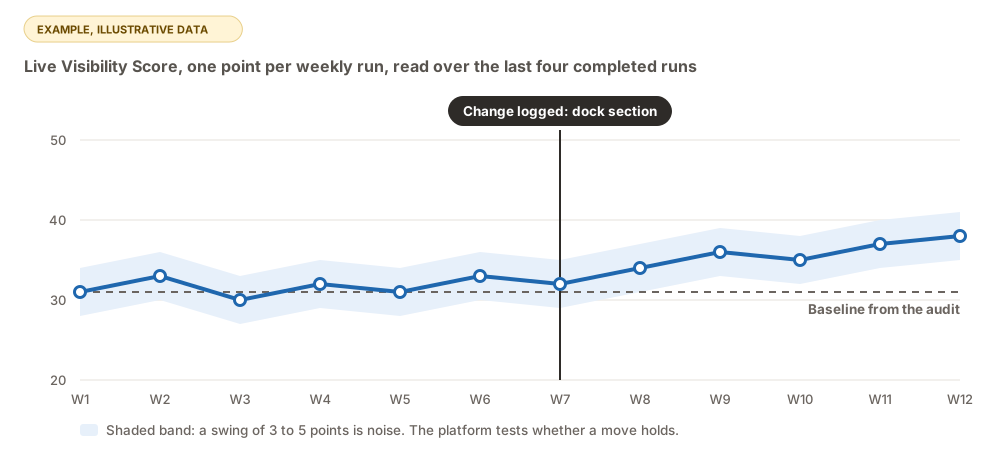
Record a press release, schema deploy, new page, directory listing or campaign, and it becomes a marker on every timeline chart.
The page shows the readings before and after each entry; changes around the same time do not establish what caused a difference.
Account
Websites
Every website (business) the account tracks.
Add a website (business name, domain, industry, location), rename it, set how often it is measured, or show inactive websites and reactivate them.
Billing
The plan, payment method and invoices through Stripe, plan changes and cancellation (Manage subscription), and run credits for runs outside the schedule.
Scheduled measurements never need credits.
Upload Answers
Upload answers collected from AI engines outside Vivander;
Vivander reads each with the same judge it uses for its own measurements and scores it.
Every answer needs the question, the engine, the date and the whole answer.
Settings
Profile, team (invite people with full access or read-only; an owner or admin invites), the run results email, the account's time zone, and help resources.
What's new
The published release notes, newest first, each listing what is new, improved, fixed and removed.
Metrics & scoring
One score built from four layers, and the words used for each answer.
What is VSS?
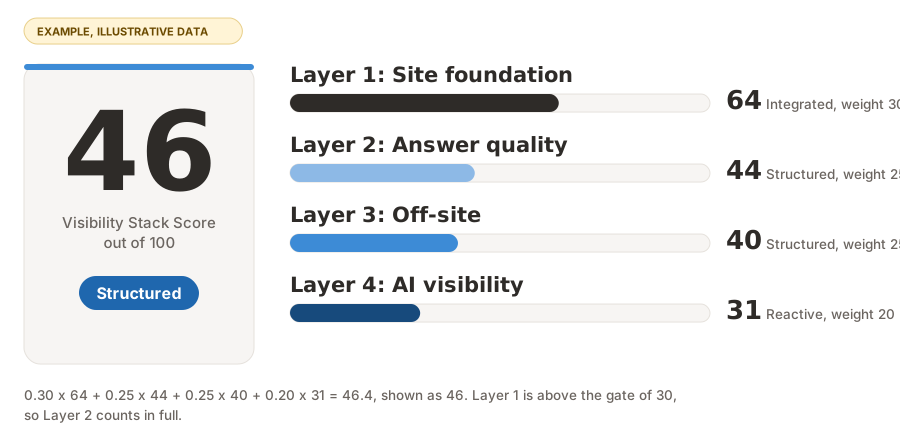
The Visibility Stack Score, 0 to 100, built from four layers. Brand prompts never enter it, because they always mention you.
It is the diagnostic score, set when an audit is run. The platform tracks the Live Visibility Score every cycle.
- Layer 1, site foundation: 30%
- Layer 2, answer quality: 25%
- Layer 3, off-site corroboration: 25%
- Layer 4, AI offered rate: 20%
When Layer 1 is under 30, a soft gate scales the Layer 2 contribution down. AI cannot quote a page it cannot reach.
The methodology explains each layer and the gate. The band color tells you where you are:
- 0 to 19 Invisible: AI does not know you. Fix corroboration (press, directories, Wikipedia, third-party listings) before the website.
- 20 to 39 Reactive: Sporadic mentions, no consistency. Fix on-site infrastructure (schema, sitemap, crawler access).
- 40 to 59 Structured: Mentioned, rarely cited. Add differentiation signals (awards, category authority).
- 60 to 79 Integrated: Cited, not yet the top pick. Compete on freshness, sentiment, share of voice.
- 80 to 100 Optimized: You win most answers. Defend the position.
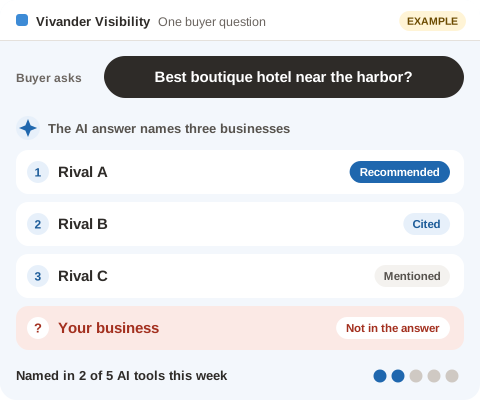
What's the difference between "mentioned", "cited", and "recommended"?
- Invisible: Not mentioned at all.
- Mentioned: Named in passing, no endorsement, no source link.
- Cited: Named with a URL or an explicit source attribution.
- Recommended: Explicitly endorsed as a top choice or best fit. Requires positive sentiment.
"I'd recommend contacting them" is deflection. It does NOT count as an endorsement.
What is Unbranded Visibility?
The percentage of non-brand prompts where your brand appeared (mentioned, cited, or recommended). It is the headline answer-engine-optimization (AEO) metric.
It answers one question: can AI find you when someone is not searching your name?
What is Share of Voice?
Of unbranded prompts where a visible mention occurred, how often only you were mentioned, with no competitor alongside.
Higher means the sampled answers mention you more often than the alternatives you track.
What does Position mean?
Where your brand appears in the AI's list: top (first in the ordered list), middle, or bottom.
It is set by where we first detect the brand name in the response text.
What is a Bridge Entity?
A local landmark, attraction, or adjacent competitor that creates demand in your market.
"Hotels near Bryant Park" is a bridge query. Whether AI connects you to Bryant Park decides if you capture that demand.
Bridge prompts live in the bridge bucket on /queries.html.
How are citations classified?
Our domain classifier gives every URL the AI cites a source class:
review_platform(WeddingWire, TheKnot, Yelp)social(Facebook, Instagram)ota(OTAs like Booking.com)wikipedia,government,news,blog,directory,video,official_site, orother
Assessment & baseline
Your first completed cycle becomes the line every later result is measured against.
What is a baseline?
Your baseline is the frozen result of your first completed cycle.
It records your VSS, pillar scores, score band, and the exact cohort of prompts that produced those numbers.
Every later data point on the assessment page is measured against it.
A change such as VSS went from 11 to 23 then means real improvement, and not "we asked different questions."
How is the baseline captured?
Automatically. When your first cycle completes, we snapshot its non-brand prompt results into a locked baseline. Nothing you need to do.
The prompts that made up that first run become your benchmark cohort.
Can the baseline change?
The cohort can be expanded by adding new prompts. It is never shrunk.
This protects the trend line while the benchmark grows with your business. Locked prompts keep their original text regardless.
How often does the assessment re-run?
Every website gets one baseline, captured on its first completed cycle. After that, scheduled cycles follow the cadence set for the website.
An on-demand run takes run credits counted from its size, stated before it starts. When the balance is short, the run is refused and you are asked to buy a credit pack.
Why does my baseline say Level 0 / Invisible?
Most businesses start here. It means AI platforms rarely surface you on unbranded queries.
That is normal, and it is the starting point the tool is designed to move you away from.
See score bands for what each band means.
What happens if I want a new baseline?
Contact support. Resetting a baseline erases your trend line, so we treat it as a deliberate action rather than a self-service button.
Usually this is done only after a major site overhaul or rebrand, when the old benchmark no longer means anything.
Prompts & runs
How many prompts should I run?
Your plan sets the number. Starter covers 50 questions, Pro 150 and Advanced 250, each the same 24 scored questions plus watch questions.
Every plan also asks 3 questions that name your business. They are reported apart and never scored.
Why are some prompts locked?
Once a prompt has been used in a run, its text, bucket, and priority are frozen. This keeps the benchmark consistent from week to week.
If the wording of an old prompt changed, comparing this week's score to last week's would mean nothing.
To track something new, add a new prompt. You can still deactivate a locked prompt so it stops running without affecting history.
Why does the same prompt produce different results on different days?
In testing, we observed that AI answers vary between tries. So every question, scored or watched, is asked three times on every engine, every cycle.
Two answers out of three decide each result, and scores are shown with intervals.
Wide intervals mean the metric is directional. Narrow intervals mean it is reliable.
Why ask three times in one day instead of once a day?
An AI answer is probabilistic, not deterministic. One answer is one sample, and it may not be the usual answer.
In testing, three same-day asks disagreed on naming the business in about 1 in 7 question and tool pairs, and in 1 in 3 where it was named at all.
One ask a day cannot see that split. On a split question, a daily line flips between named and not named, and that reads as movement.
Three asks on one day show whether the answers agreed that day (three of three) or were contested (two of three). A later run can differ.
Every engine is asked in the same weekly run, so a gap between engines is not a gap between days. Week against week then measures change.
What are prompt "buckets"?
- brand: Direct brand queries, such as "Tell me about Wentworth Weddings."
- service: Specific offerings, such as "Who does outdoor wedding ceremonies in NH?"
- category: Best-in-category, such as "Best boutique hotel in Manhattan."
- persona: Written in the voice of a specific buyer type, such as "Wedding venue for a business traveler."
- bridge: Local landmark comparisons, such as "Wentworth vs Cliff House Maine."
- problem: Problem-solution, such as "How do I plan a destination wedding in NH?"
Competitors
What does "tracking a competitor" actually do?
A tracked competitor is counted in the answers to your questions, so the Competitive Scoreboard, Share of Voice and Competitive Presence include them.
Every count opens the answers behind it.
A competitor you name but do not track still shapes your questions and is spotted in AI answers, at no cost. It is listed, never counted.
Website Watch goes further for the competitors you choose. Each week we re-read pages on their website and flag what changed.
We suggest a possible reason (a hypothesis, not a finding) and check whether the changed pages appear in AI answers.
A page we could not read shows as a failed check, never as no change.
How many competitors can I track?
Your plan sets how many competitors are tracked and how many of their websites are under Website Watch, up to 15 pages each. Pricing lists both.
When you reach a limit, the Competitors and Website Watch pages offer an add-on. Nothing is bought without your confirmation.
Start with direct substitutes rather than upmarket alternatives. A comparison works only when the same buyer considers both.
Action Plan
Each project on the Action Plan moves through a status as your team works on it.
Found in your latest run, waiting for review.
You or your team took it on.
The work is done; the next retest reads its effect.
A retest of the same questions has read the effect.
Where do the projects come from?
From the answers in your latest measurement run.
Before a project is raised, each question is classified: whether it names your business and what it asks for.
A project that assumes a recommendation was needed is never raised from a question that did not call for one.
The same work found twice is one project, and projects that share a question or a target are grouped together.
Each project shows the questions it came from, so you can read the answers before acting.
Which projects should I tackle first?
The list is in priority order. Marking a question as a priority moves its project up on the next update.
A project stays in Investigate until someone supports its diagnosis with evidence. Then it is ready to do.
If your score is in the Invisible band, start with projects outside your website: listings, reviews and coverage on other sites.
Those raise the score fastest when AI does not know you.
What does each status mean?
- Suggested: raised from your latest run and not yet started.
- In progress: you or your team started it (or it is blocked, which the card says).
- Ready to measure: the work is done, and the next retest reads its effect.
- Measured: a retest that asks the same questions has read the effect. It is set by the reading, never chosen.
- Dismissed: you decided not to pursue it, or it was merged into another project.
Assistant chatbot
What is the lightbulb in the bottom-right?
The Vivander Assistant. Click it to open a chat panel.
The assistant sees whatever page you have open and knows your data: your VSS, your top missed queries, your tracked competitors.
Ask "what am I looking at?", "why is my VSS what it is?", or paste a competitor's URL and ask "what do you see here?".
Can I attach a URL or a screenshot?
Yes. Use the link icon to paste a URL (the assistant fetches and reads it). Use the image icon to upload a screenshot (up to 5 MB, PNG/JPEG/WebP).
Raw images are not stored in the database; only metadata persists.
Do my messages persist?
Yes. Each conversation is a thread tied to your user account. Close the browser, come back tomorrow, and pick up where you left off.
Start a new thread any time with the New button in the panel header.
Plans & billing
What plans are available?
Three monitoring plans (Starter, Pro and Advanced), Bring Your Own Answers, and Agency and Enterprise, which are built to order.
Every monitoring plan gets the same locked core of 24 scored questions, every score, every page, every answer and every export.
Every question is asked three times on every engine, every week. Plans differ in how many questions they cover and which engines run:
- Starter: 50 questions on five engines
- Pro: 150 questions on five engines
- Advanced: 250 questions on six engines, adding Microsoft Copilot
- Bring Your Own Answers: you upload the AI answers you collect, and we score them. 300 answers a month are included.
- Agency and Enterprise: built to order
A custom plan from Build your plan is priced from our measured cost. Prices are on Pricing, read live from billing.
Starter, Pro and Advanced are billed monthly or yearly, with a discount off the monthly price by the year; the pricing page shows both. There is no free trial.
What happens when I run out of run credits?
An on-demand run is refused with a message to buy a credit pack. Nothing is billed automatically.
Every score and answer already collected stays viewable. Credits do not expire.
How do I get started?
Create an account and confirm your email. Your account opens, and you start the plan you chose. Nothing is charged before that.
Sign up with your business email address, the one at your company's own domain; free email providers such as gmail.com are not accepted.
The website's first completed cycle is its baseline. There is no free trial.
How do I cancel?
Open Billing, click Manage subscription (opens Stripe Customer Portal), click Cancel.
Access continues until the end of the current billing period.
Team & admin
What roles exist?
- owner: Full access; receives escalation emails.
- admin: Full access; can invite others; can escalate to owner.
- member: Full non-admin access.
- viewer: Read-only.
How do I invite a teammate?
Open Settings and use the Team card. Enter their email and choose full access or read-only. An owner or admin of the account can invite.
Every plan includes unlimited team members with full access, and unlimited read-only viewers. The price does not change with the number of people.
The Invite page is for Vivander administrators opening a new client account. It does not add anyone to yours.
What does "Escalate to owner" do on a lead?
Admin-role team members can flag an inbound lead as urgent.
The account owner(s) receive an email with the lead summary, any note you added, and a deep link to the lead in admin-leads. The lead row gets a red URGENT pill.
Re-escalating keeps the original timestamp and re-sends.
Data & privacy
Where is my data stored?
A secure, encrypted database hosted in the United States (Oregon).
Strict per-account isolation keeps every customer's data separate. Your runs, queries, opportunities, and threads are never accessible to other customers.
The services that process your data on our behalf are listed in the Privacy Policy, section 4.
What happens to my data if I cancel?
The dashboard becomes read-only and new runs stop.
Existing runs, opportunities, and competitors are preserved for 30 days, then deleted (GDPR-compliant data minimization). One reactivation email goes out on day 30.
Can I export my data?
Yes. Exports are included on every plan, not held back for a higher tier.
The answers feed exports every answer verbatim with its tier, sentiment, position and citations.
Tables export to CSV, and a full data export downloads everything for a website as one zip of CSV files. There is no API access.
Troubleshooting
My score is 0. Is that broken?
Almost certainly the score is real. A score of 0 means no non-brand question returned a cited or recommended answer over the last four completed cycles.
This is the Invisible band, and it is common for businesses that haven't done AEO work.
Fix corroboration (third-party mentions, directories, Wikipedia) first. On-site SEO won't help until AI has multiple sources to pull from.
The dashboard donut is all one color.
Hard refresh (Ctrl/Cmd + Shift + R).
We ship CSS and JS updates with versioned URLs, and an older cached copy sometimes lingers behind a CDN layer.
A run says "running" for more than 10 minutes.
The run worker reports back to visibility_audits.status.
If it still says running after 15 minutes, check Costs. An engine that hit its rate limit (most often Gemini) shows zero cost for that engine's rows.
Contact support and we will re-queue it.
I changed my industry but the prompt library didn't update.
Expected. Existing prompts stay as-is (locked). To use the new industry's library, open Questions and click Add starter prompts.
It adds the new industry's prompts on top of what you already have, skipping duplicates.
I don't see my tracked competitor's changes.
Page changes are checked only for competitor websites under Website Watch, on the pages you chose there.
Tracking a competitor in AI answers alone does not check their pages.
Nothing is reported until a first weekly check has captured a baseline, so a newly watched page shows changes from its second check on.
A page we could not read shows as a failed check, never as no change.
Still stuck?
Click the lightbulb in the bottom-right of any authenticated page. The assistant sees your current page and knows your numbers.